How to resolve Common "Windows Installer" Problems
Author: Yuval Sinay MVP
This is a common problem i faced, here is the solution but i do not know whether it will work properly. I have tried method one with no success, but i guess microsoft need to give serious attention to Windows Installer problems.
Here is how - written by Yuval Sinay of Microsoft Support. He has Listed 12 different method to do this.
Resolve Common "Windows Installer" Problems
Method 1
Unregister Windows Installer, and then reregister Windows Installer. To do this, follow these steps:
1. On the "Start" menu, click "Run:.
2. In the "Open" box, type "msiexec /unreg", and then press ENTER.
3. On the "Start" menu, click "Run".
4. In the "Open" box, type "msiexec /regserver", and then press ENTER.
Method 2
Upgrade to Windows Installer version 2 or newer version. To do this, follow these steps:
1. Start Microsoft Internet Explorer, and then browse to the following Microsoft Web site:
http://msdn.microsoft.com/downloads
2. In the left pane tree menu, click "Setup and System Administration", and then click "Setup".
3. Click "Windows Installer", and then click the appropriate link for your operating system.
4. Click "Download" to download and install Windows Installer version 2 or newer version.
Method 3
Use Windows Installer CleanUp Utility to uninstall the failed product.
Description of the Windows Installer CleanUp Utility
http://support.microsoft.com/default.aspx?scid=kb;en-us;290301
Method 4
The Windows Installer service may disabled on the machine.
1. Go to "Start" -> "Run" , type "services.msc" and press on "Enter" button.
2. Double-click on the service named "Windows Installer".
3. Check the value in the "Startup type:" field. If it's currently set to "Disabled", then this is the
problem. Change it by selecting "Manual" from the drop-down box.
Method 5
Empty user and system "temp" folders.
1. Empty "%systemdrive%\temp" folder.
2. Empty "%systemdrive%\%windir%\temp" folder.
3. Empty "%systemdrive%\Documents and Settings\%username%\Local Settings\Temp".
Method 6
Enable Windows Installer Logging and call to PSS support.
How to Enable Windows Installer Logging
http://support.microsoft.com/default.aspx?kbid=223300
How to Enable Windows Installer Logging in Windows XP
http://support.microsoft.com/default.aspx?scid=kb;EN-US;314852
Method 7
Check correct DCOM and System permissions:
http://support.microsoft.com/?id=319624
Method 8
If you just upgrade Windows XP workstation to service pack 2 and the windows installer
problem appear only after this upgrade, please review the following knowledgebase:
http://support.microsoft.com/default.aspx?scid=kb;en-us;885894
Method 9
Check that the installation path length and environment variables length are execute
255 characters
Method 10
If you get the message error "Error 1628: Failed to complete script based install"
And followed the instruction above and it didn’t resolve the problem and you just create fresh
installation packet by using InstallShiled tool, please disable "Cache installation on local machine"
option during the installation packet create process.
Method 11
Check if there pending installation/s:
Warning: You should only edit these registry entries if you really know what you're doing. Back up your hard disk first.
a. Empty "InProgress" Registry Key
Check the following registry key:
HKLM\Software\Microsoft\Windows\CurrentVersion\Installer\InProgress
and clean any entries that you find.
b. Empty/Rename "PendingFileRenameOperations" Registry Key:
Check the following registry key:
HKLM\System\CurrentControlSet\Control\Session Manager\PendingFileRenameOperations
and clean any entries that you find.
Method 12
Obtain update MSI Package from the software manufacture.
Article : How to resolve Common "Windows Installer" Problems by Yuval Sinay from :
http://support.microsoft.com/kb/555175

Friday, May 21, 2010


Friday, December 18, 2009
Blogging Universities.
If only there is a degree for blogging, LiewCf could have got a phd on this. Edwardkhoo maybe his first degree. - just that the field is not formalised in the education system yet. (think about it) . a person have to acquire some skills to make money online. Whenever there is a learning curve involved, there is 'education' and process of learning going on.
i posted above comment on recent LiewCF blog. DO you really think we need to have a formal education on Blogging and Internet Marketing, like a degree or diploma. I beleive in the marketing field, someone can do a thesis or detail study on this matter. I remember buying a book froma Harvard Graduate entitled 'NetWorth' written by John Hagel III and Marc Singer.
The book basically is about Looking at the future of e-commerce, Hagel (coauthor of Net Gain) and Singer, both principals in the consulting firm McKinsey & Company, add a provocative twist to the conventional view that those companies with the best information about their customers will be the most successful.
They examine not only how companies can acquire information about consumers but also, crucially, how consumers can control dissemination of their personal information and even charge companies for their use of it. To the ever-expanding e-commerce lexicon they add a new term: "infomediaries."
That part of this thread is taken from Amazon. Amazon best decribed the authors book synopsis.
The book published by Harvard Business Press. I believe, we can have someone with a specialised degree in Blogging and Internet Marketing or popularly pronouced by goverments and formal institutions as e-commerce.
to view the book visit the link below
i posted above comment on recent LiewCF blog. DO you really think we need to have a formal education on Blogging and Internet Marketing, like a degree or diploma. I beleive in the marketing field, someone can do a thesis or detail study on this matter. I remember buying a book froma Harvard Graduate entitled 'NetWorth' written by John Hagel III and Marc Singer.
The book basically is about Looking at the future of e-commerce, Hagel (coauthor of Net Gain) and Singer, both principals in the consulting firm McKinsey & Company, add a provocative twist to the conventional view that those companies with the best information about their customers will be the most successful.
They examine not only how companies can acquire information about consumers but also, crucially, how consumers can control dissemination of their personal information and even charge companies for their use of it. To the ever-expanding e-commerce lexicon they add a new term: "infomediaries."
That part of this thread is taken from Amazon. Amazon best decribed the authors book synopsis.
The book published by Harvard Business Press. I believe, we can have someone with a specialised degree in Blogging and Internet Marketing or popularly pronouced by goverments and formal institutions as e-commerce.
to view the book visit the link below
Tuesday, November 10, 2009
Thank You Eblog Template & Hong Kiat.com
Hi Shah-
Thank you for subscribing to eBlog Templates exclusive email content!
Our goal is to make you more successful as a blogger by providing you the knowledge and tools all for free.
I will be sending you some great tips and tricks over the next few days that will help you become a much better blogger.
In the meantime, I recommend spending time reading our latest blog articles and comments where you can exchange knowledge with other bloggers just like you.
Our blogging community is our strongest asset so I encourage you to utilize it.
Best of luck with your blog and I will see you again soon!
To Your Blogging Success,
~David Cowgill
Founder, eBlog Templates
http://www.eblogtemplates.com
---- I SHOULD THANK YOU MORE!!!!
Thank you for subscribing to eBlog Templates exclusive email content!
Our goal is to make you more successful as a blogger by providing you the knowledge and tools all for free.
I will be sending you some great tips and tricks over the next few days that will help you become a much better blogger.
In the meantime, I recommend spending time reading our latest blog articles and comments where you can exchange knowledge with other bloggers just like you.
Our blogging community is our strongest asset so I encourage you to utilize it.
Best of luck with your blog and I will see you again soon!
To Your Blogging Success,
~David Cowgill
Founder, eBlog Templates
http://www.eblogtemplates.com
---- I SHOULD THANK YOU MORE!!!!
Withdraw/Direct Transfer your PayPal Account money to Bank in Malaysia
Withdraw/Direct Transfer your PayPal Account money to Bank in Malaysia without buying any debit card. Just use your own ATM card to do this.
Almost all the bank in Malaysia is now accepting PayPal direct bank account transfer. Mayabnk, CIMB, Hong Leong, Public Bank.. all..the the images below.
Thank You Paypal for making it easier for Malaysian.!!!
Here si how you do it.
1. Login yo your paypal account.
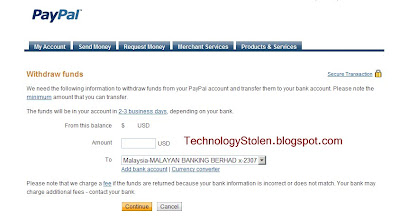
2. Click withdraw
3. Tt will show you to choose withdraw to local bank. click. and the window will appear.
4. Withdrawal charges apply up to RM3.00 only. (you can check the details charges)for more than $400 its free it think.
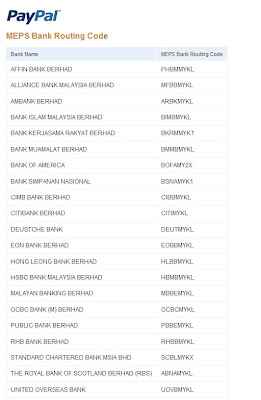
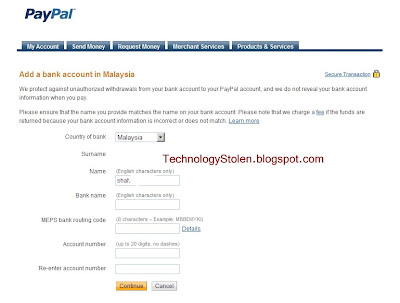
5. Select your bank plus the bank code.
6. Key in your bank account number.
7. Key in your amount and watch the currency conversion rate.
8. Agree withthe amount
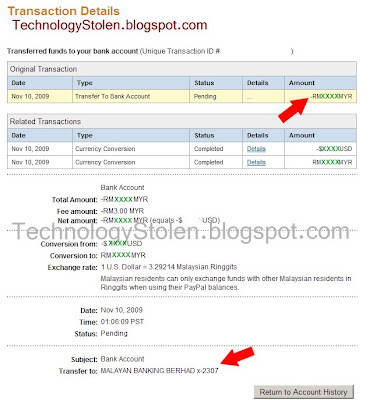
9. Then submit. you can always check the detail transaction later and see the cost deducted from the original amount transfered. Just about MYR3.00.
10. Transaction will be processed/ your hard Earned internet money from your PayPal Account will be in your personal local bank in 2-3 Business Day.
THANK YOU SO MUCH PAYPAL for making it easy for us in Malaysia. I hope this is helpful guys.
regards,
SHAH
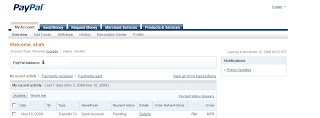
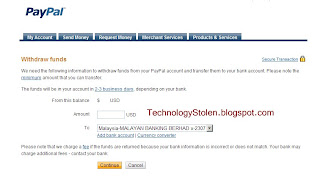
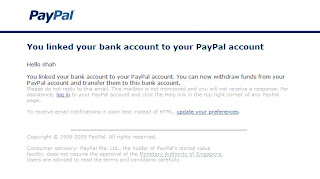

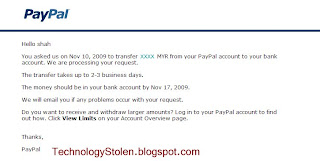
Withdraw/Direct Transfer your PayPal Account money to Bank in Malaysia
My Internet money in paypal account can now be withdrawn directly into your local bank account in a very simple step.
Almost all the bank in Malaysia is now accepting PayPal direct bank account transfer. Mayabnk, CIMB, Hong Leong, Public Bank.. all..the the images below.
Thank You Paypal for making it easier for Malaysian.!!!

Here si how you do it.
1. Login yo your paypal account.
2. Click withdraw
3. Tt will show you to choose withdraw to local bank. click. and the window will appear.
4. Withdrawal charges apply up to RM3.00 only. (you can check the details charges)for more than $400 its free it think.
5. Select your bank plus the bank code.
6. Key in your bank account number.
7. Key in your amount and watch the currency conversion rate.
8. Agree withthe amount
9. Then submit. you can always check the detail transaction later and see the cost deducted from the original amount transfered. Just about MYR3.00.
10. Transaction will be processed/ your hard Earned internet money from your PayPal Account will be in your personal local bank in 2-3 Business Day.
THANK YOU SO MUCH PAYPAL for making it easy for us in Malaysia. I hope this is helpful guys.
regards,
SHAH


Withdraw/Direct Transfer your PayPal Account money to Bank in Malaysia
My Internet money in paypal account can now be withdrawn directly into your local bank account in a very simple step.
Subscribe to:
Posts (Atom)